Quick answer
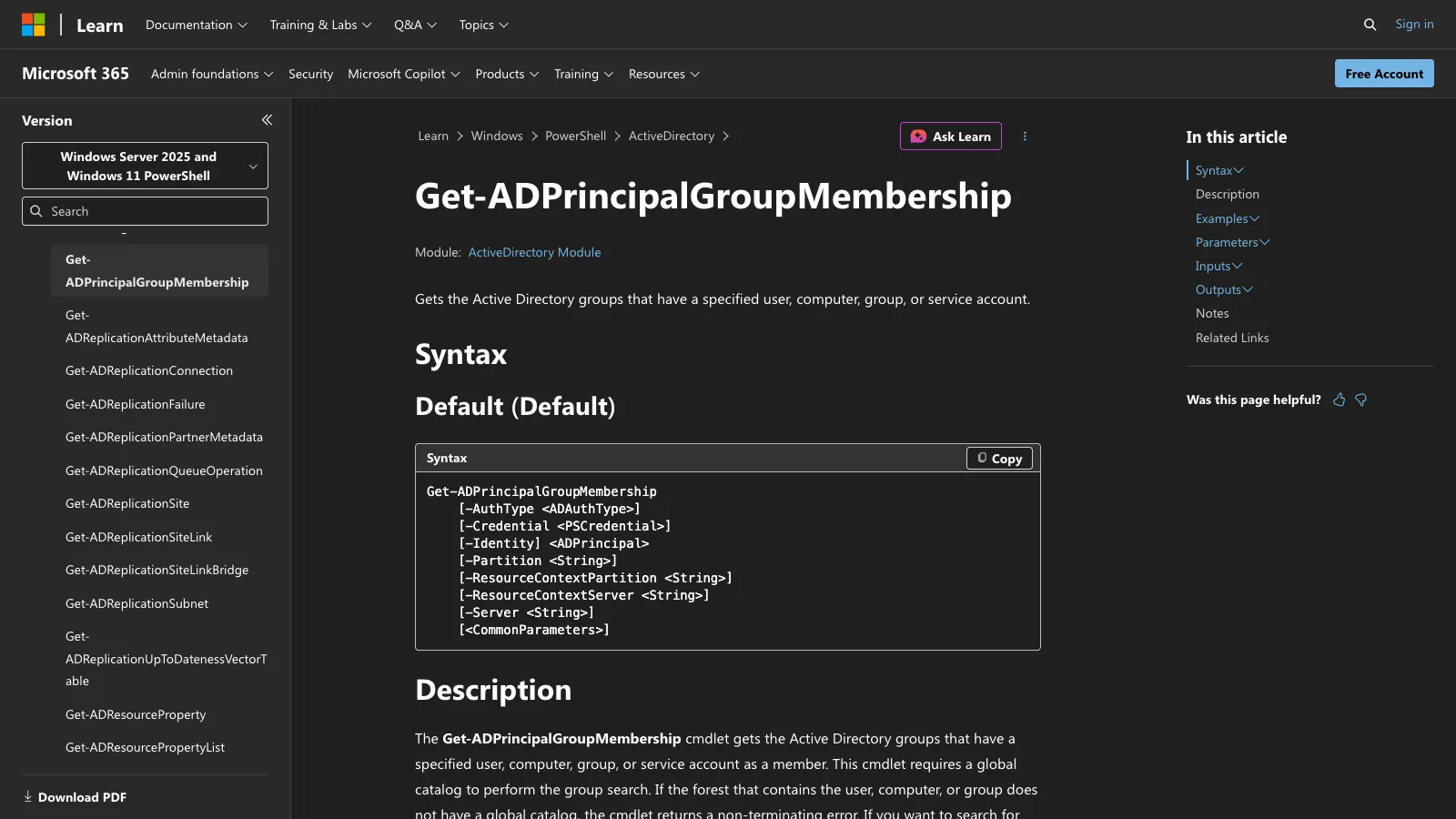
Get-ADPrincipalGroupMembership lists the Active Directory groups that a user, computer, group or service account is a member of. Give it the account:
Get-ADPrincipalGroupMembership -Identity amyc
-Identity is required and positional, so Get-ADPrincipalGroupMembership amyc works too. Add | Select-Object Name for a plain list of group names.
The cmdlet is part of the ActiveDirectory module. If PowerShell doesn't recognize it, install the Remote Server Administration Tools (RSAT). On Windows 10 from the October 2018 Update onward, RSAT is a set of Features on Demand: open Manage optional features in Settings, choose Add a feature and pick the Active Directory tools.
What does Get-ADPrincipalGroupMembership do?
It answers "which groups is this account in?" It reads the directory and doesn't change anything. It needs a global catalog to search for groups.
-Identity accepts any of these:
| Value | Example |
|---|---|
| Distinguished name | "CN=Amy Cole,OU=Staff,DC=contoso,DC=com" |
| GUID (objectGUID) | "6f2b4c1e-3d5a-4b7e-9c8f-1a2b3c4d5e6f" |
| Security identifier (objectSid) | "S-1-5-21-41432690-3719764436-1984117282-1105" |
| SAM account name (sAMAccountName) | amyc |
You can also pipe in a user, computer, group or service account object from another cmdlet.
It's the reverse of Get-ADGroupMember, which starts from a group and lists who is in it.
| You have | You want | Cmdlet |
|---|---|---|
| A user, computer or group | The groups it belongs to | Get-ADPrincipalGroupMembership |
| A group | Its members | Get-ADGroupMember |
| A name or filter | The user object | Get-ADUser |
| A name or filter | The computer object | Get-ADComputer |
Examples
| Goal | Command |
|---|---|
| Groups for one user | Get-ADPrincipalGroupMembership -Identity amyc |
| Group names only, sorted | Get-ADPrincipalGroupMembership amyc | Sort-Object Name | Select-Object Name |
| Groups for a computer | Get-ADComputer PC01 | Get-ADPrincipalGroupMembership |
| Groups a group belongs to | Get-ADGroup "Finance Team" | Get-ADPrincipalGroupMembership |
| Security groups only | Get-ADPrincipalGroupMembership amyc | Where-Object GroupCategory -eq "Security" |
| Is the user in one group? | Get-ADPrincipalGroupMembership amyc | Where-Object Name -eq "Finance Team" |
| Count the groups | (Get-ADPrincipalGroupMembership amyc).Count |
| Groups in another domain | Get-ADPrincipalGroupMembership amyc -ResourceContextServer child.contoso.com |
What does it return?
Each result is a group object with a default set of properties: distinguishedName, GroupCategory, GroupScope, name, objectClass, objectGUID, SamAccountName and SID.
For more properties, such as a group's description, pipe the results to Get-ADGroup and ask for them with -Properties:
Get-ADPrincipalGroupMembership -Identity amyc |
  Get-ADGroup -Properties Description |
  Select-Object Name,GroupScope,Description
How do I export a user's groups to CSV?
Pick the columns, then write the file:
Get-ADPrincipalGroupMembership -Identity amyc |
  Select-Object Name,GroupCategory,GroupScope |
  Export-Csv amyc-groups.csv -NoTypeInformation
For several users, loop over them and add the user to each row:
Get-ADUser -Filter "Department -eq 'Finance'" | ForEach-Object {
  $user = $_
  Get-ADPrincipalGroupMembership -Identity $user |
    Select-Object @{n='User';e={$user.SamAccountName}},Name,GroupScope
} | Export-Csv finance-groups.csv -NoTypeInformation
How do I find groups in another domain?
By default it returns groups from the account's own domain. To list the account's groups that live in a different domain, point -ResourceContextServer at that domain:
Get-ADPrincipalGroupMembership -Identity amyc -ResourceContextServer child.contoso.com
That searches the domain's default partition. To search a different partition on that server, add -ResourceContextPartition with its distinguished name.
How do I use it with AD LDS?
In Active Directory Lightweight Directory Services, give the server and port, and the partition:
Get-ADPrincipalGroupMembership -Server localhost:60000 -Identity "CN=Amy Cole,DC=AppNC" -Partition "DC=AppNC"
-Partition is required in AD LDS unless you run the command from an Active Directory provider drive, or the instance has a default naming context. You set that default in the msDS-defaultNamingContext property of the instance's directory service agent object (nTDSDSA). If -Identity is a distinguished name, the cmdlet takes the partition from it.
How do I run it as another account?
Pass -Credential. Build the credential with Get-Credential:
$cred = Get-Credential
Get-ADPrincipalGroupMembership -Identity amyc -Credential $cred -Server dc01.contoso.com
-AuthType takes Negotiate (the default) or Basic. Basic needs an SSL connection.
Why doesn't Get-ADPrincipalGroupMembership work?
| Symptom | Likely cause | Fix |
|---|---|---|
| The term Get-ADPrincipalGroupMembership isn't recognized | The ActiveDirectory module isn't installed | Add the RSAT Active Directory tools from Manage optional features |
| An error about the global catalog | The forest has no global catalog | Run it in a forest with a global catalog |
| An error that more than one object was found | The identity matches two or more objects | Pass a distinguished name, GUID or SID instead |
| An access error stops the command | Your account lacks directory permission | Use -Credential with an account that has it |
| It can't find the object in AD LDS | No partition was given | Add -Partition |
| Groups from another domain are missing | It searched the account's own domain | Add -ResourceContextServer |
| It fails against a snapshot | The cmdlet doesn't work with an Active Directory snapshot | Run it against a live domain controller |
| Basic authentication fails | Basic needs SSL | Use Negotiate, or connect over SSL |
How do I check the result?
Count the groups, then look for one you expect:
(Get-ADPrincipalGroupMembership -Identity amyc).Count
Get-ADPrincipalGroupMembership -Identity amyc | Sort-Object Name | Format-Table Name,GroupScope,GroupCategory
To confirm from the other side, list the group's members with Get-ADGroupMember and check the account is there.
Sources
- Get-ADPrincipalGroupMembership on Microsoft Learn
- Get-ADGroup on Microsoft Learn
- ActiveDirectory module on Microsoft Learn
Meeting Room 365 turns any iPad or Android tablet into a room display for Exchange and Microsoft 365 calendars. See the features or pricing: $9 a room a month.