Quick answer: open Windows PowerShell as administrator on the domain-joined computer and run Test-ComputerSecureChannel. It returns True if the computer's trust with the domain works and False if it's broken. To fix a broken channel without rejoining the domain, run Test-ComputerSecureChannel -Repair -Credential (Get-Credential) with a domain account that can reset computer passwords.
What does Test-ComputerSecureChannel do?
It checks the secure channel: the trust between a domain member computer and its domain, run by the NetLogon service. When that trust breaks, domain sign-ins fail, often with the error "The trust relationship between this workstation and the primary domain failed."
The cmdlet works much like netdom.exe and returns a plain $true or $false, so you can use it in scripts. With -Repair, it removes and rebuilds the channel.
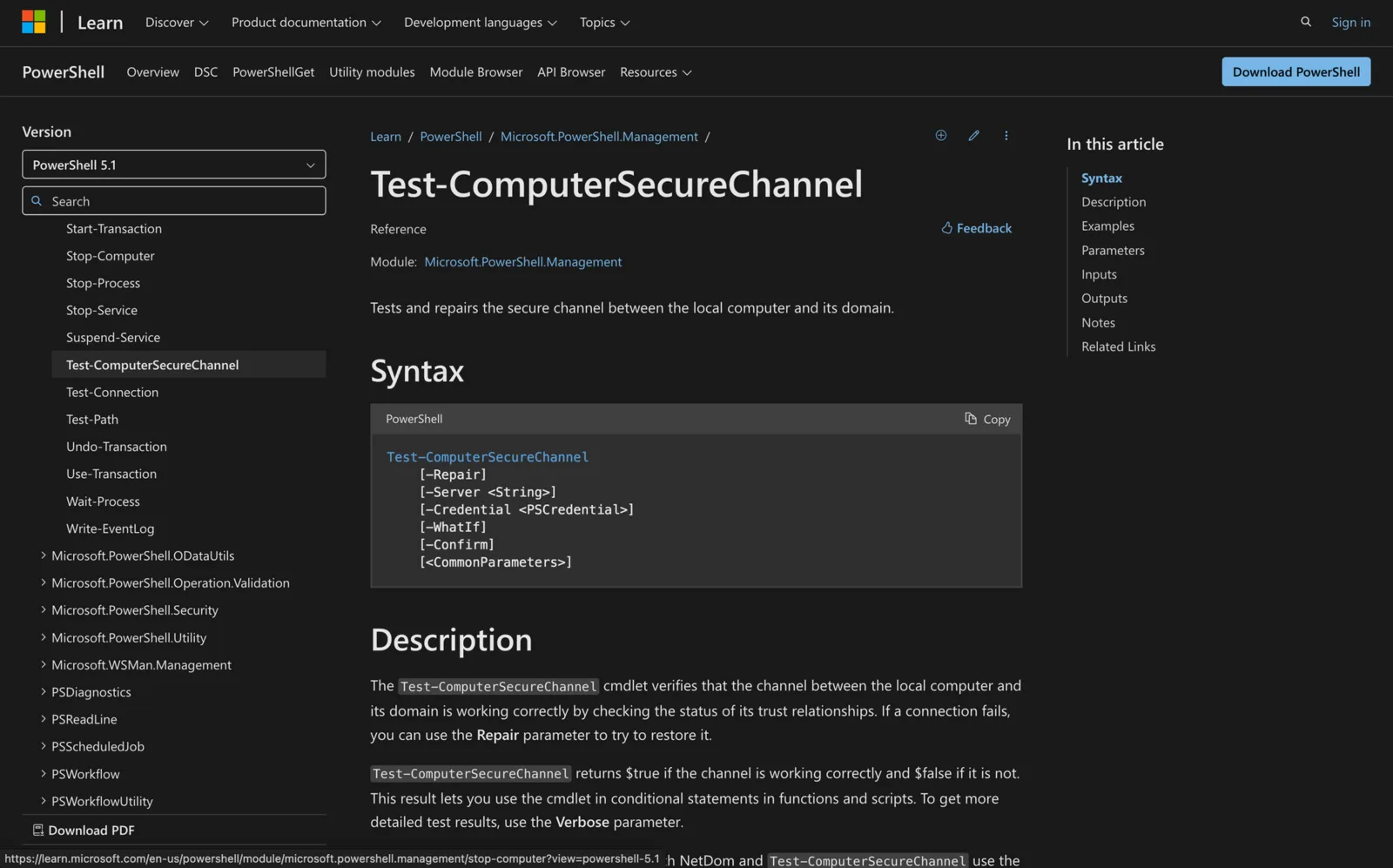
Syntax, from Microsoft Learn:
Test-ComputerSecureChannel
    [-Repair]
    [-Server <String>]
    [-Credential <PSCredential>]
    [-WhatIf]
    [-Confirm]
    [<CommonParameters>]
How do I check domain trust with PowerShell?
- Sign in to the computer. If domain sign-in fails, use a local administrator account.
- Open Windows PowerShell with Run as administrator.
- Run:
Test-ComputerSecureChannel
True means the trust works. False means it's broken.
For more detail, add -Verbose:
Test-ComputerSecureChannel -Verbose
VERBOSE: Performing operation "Test-ComputerSecureChannel" on Target "SERVER01".
True
VERBOSE: "The secure channel between 'SERVER01' and 'net.fabrikam.com' is alive and working correctly."
How do I test against a specific domain controller?
Use -Server. Without it, the cmdlet picks a domain controller for you.
Test-ComputerSecureChannel -Server "DC01.fabrikam.com"
If one domain controller returns False and another returns True, the problem is that domain controller, not the computer.
How do I repair a broken secure channel?
Run, as administrator:
Test-ComputerSecureChannel -Repair -Credential (Get-Credential)
Enter a domain account with permission to reset the computer's account, for example FABRIKAM\Admin01. -Credential is meant for exactly this: repairs. Without it, the cmdlet uses the signed-in user, which on a broken machine is often a local account that the domain won't accept.
Then run Test-ComputerSecureChannel again. If it returns True, restart and sign in with a domain account.
To preview the repair without making it, add -WhatIf.
What if -Repair doesn't work?
Reset the computer account password directly:
Reset-ComputerMachinePassword -Server "DC01" -Credential FABRIKAM\Admin01
If that fails too, remove the computer from the domain and join it again. That's the last resort: it takes the most steps and a restart each way.
Requirements and limits
- Run as administrator. Microsoft's notes say to open PowerShell with Run as administrator.
- Local Administrators group for -Repair. The user running the repair must be in it.
- Windows PowerShell 5.1 only. The cmdlet isn't in PowerShell 7. Run it in Windows PowerShell (
powershell.exe), notpwsh. - Domain members only. On a domain controller it returns false errors. Use
netdom.exeornltest.exethere.
Can I use it in a script?
Yes. It returns a Boolean, so you can check the channel before running anything that needs the domain:
if (!(Test-ComputerSecureChannel)) {
    Write-Host "Connection failed. Reconnect and retry."
}
Summary
Test-ComputerSecureChannel: True means the trust works, False means it's broken.-Server: test against one domain controller.-Repair -Credential (Get-Credential): rebuild the trust without rejoining the domain.- Still broken:
Reset-ComputerMachinePassword, then rejoin. - Run Windows PowerShell 5.1 as administrator, on member computers only.