On iOS 12.0 and 12.1, an iPad in Guided Access ignores its Auto-Lock and brightness settings. The display can dim or lock during a meeting. Apple fixed this in iOS 12.1.1.
1. Update iOS
Every iPad that runs iOS 12 can update to iOS 12.5.7 or later. Apple released iOS 12.5.7 in January 2023 for the iPad Air, iPad mini 2 and iPad mini 3. These are the last iPads that stop at iOS 12.
- Open Settings.
- Tap General, then Software Update.
- Install the update.
2. Mirror Auto-Lock in Guided Access
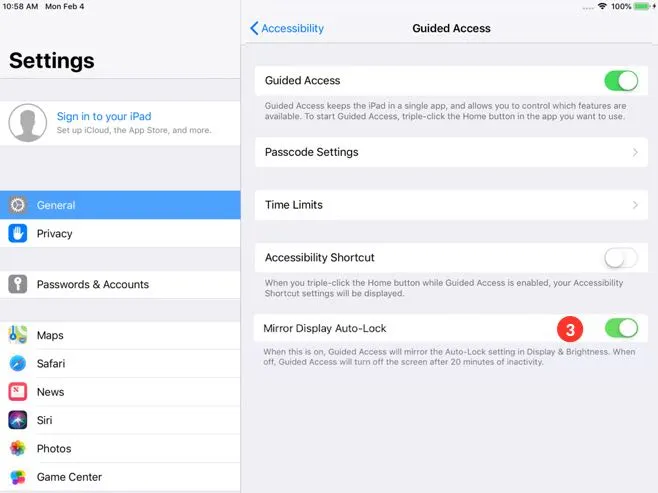
If the display still dims or locks after the update, set Guided Access to use the iPad's own Auto-Lock setting.
- Open Settings.
- Tap General, then Accessibility.
- Tap Guided Access.
- Turn on Mirror Display Auto-Lock.
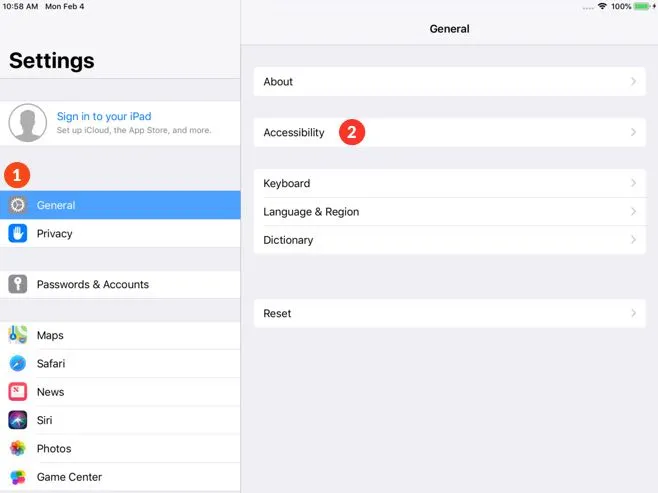
On iPadOS 13 and later, Accessibility is at the top level of Settings. Tap Accessibility, then Guided Access, then Display Auto-Lock.